E-mail from Kevin Dixon to all reference and circulation staff and all managers, Thursday, June 21:
I understand that many agencies have questions about sending items to Tech Services. The instructions for this can be found [on the Go Live training wiki] here.
You basically check items out to internal user ids. If you are wondering what user id to use, I have created a page that lists agency-specific user ids that you use to mark items missing, discard, send to tech services, etc. This page can be found by following this link (and it is linked to many times on the above link). This page lists all agencies. Click on your agency to see your personalized list of user ids.
If you have any questions about this, please let me know and I will be glad to walk you through it.
Thanks,
Kevin
Showing posts with label Training. Show all posts
Showing posts with label Training. Show all posts
Monday, June 25, 2007


Branch Abbreviations Page
E-mail from Kevin Dixon to all reference staff, Tuesday, June 19:
As mentioned in training, we use the "Missing, Hold" check out tool to do many things to our items. We can use it to mark items missing, to send it to tech services, to discard it, etc. All we do is type our agency's 3 letter abbreviation and the code for the destination of the item (discard = DISCARD; Material Services = MATSVS, etc.) in the User ID box. Then type or scan the item id. The item is now "checked out" to that specialized user account.
I have created personalized user ids for each location. Just go to this page and click on your agency to see the personalized list.
To see further information regarding the "Missing, Hold" check out tool, visit this link.
Related to this, the instructions for marking items missing have been expanded.
If I need to add anything, just let me know.
Thanks,
Kevin
As mentioned in training, we use the "Missing, Hold" check out tool to do many things to our items. We can use it to mark items missing, to send it to tech services, to discard it, etc. All we do is type our agency's 3 letter abbreviation and the code for the destination of the item (discard = DISCARD; Material Services = MATSVS, etc.) in the User ID box. Then type or scan the item id. The item is now "checked out" to that specialized user account.
I have created personalized user ids for each location. Just go to this page and click on your agency to see the personalized list.
To see further information regarding the "Missing, Hold" check out tool, visit this link.
Related to this, the instructions for marking items missing have been expanded.
If I need to add anything, just let me know.
Thanks,
Kevin
Monday, June 18, 2007
Placing Holds For Your Book Clubs
E-mail from Kevin Dixon to all reference and circulation staff, Monday, June 18:
Many of you have your own branch book club. In the past, you may have called all the locations with available copies so that they could send them to you. This was time consuming. Now, you can just place holds on these materials.
Briefly, you can:
Also, I have created a table of contents for all of the Go Live contents on the wiki. You may find that this is easier for you to review and find what you need.
Thanks,
Kevin
Many of you have your own branch book club. In the past, you may have called all the locations with available copies so that they could send them to you. This was time consuming. Now, you can just place holds on these materials.
Briefly, you can:
- Use your agency hold account to place the hold.
- Use a Title level hold (because you do not have the item in your hand).
- Once you place the hold, you can place another hold for this user.
- Enter the same Item ID and place another title level hold.
- You will need to override because the computer will say that you already have a hold.
- Repeat as many times as necessary.
Also, I have created a table of contents for all of the Go Live contents on the wiki. You may find that this is easier for you to review and find what you need.
Thanks,
Kevin
Copy Level Holds and Agency Hold Accounts
E-mail from Kevin Dixon to all reference and circulation staff, Friday, June 15:
We have received our first Pick List report! I have noticed that several copy level holds were placed with agency hold accounts on items showing available at other agencies. Copy-level, agency-hold-account holds should only be used when a staff member has the item in their hand.
If you are helping a customer who wants a book placed on hold that is available at another location, you have a couple of options:
First, you can suggest what we have always suggested: that the customer (or you) call the location with an available copy. That location would then place a COPY level hold on the item (because they have it in their hand) with the pick-up location's hold account (pkyhold, cenhold, etc.). This guarantees immediately that the customer will have a copy. Because we are placing a hold with an agency hold account, the customer will NOT be notified when this item reaches the pickup location. We give the same advice we always have ("I will send this book, it should be there tomorrow, but I would suggest calling to make sure it got there"). This process is described here.
Second, if the customer would rather not call or if the location with an available copy is currently closed, you can place a TITLE level hold on the item. It is necessary to place the hold to the customer's library card number (not an agency hold account) since it is not possible for a staff member to get their hands on the book. This hold will appear on the owning agency's next pick list report. If that agency ends up marking that item missing, the hold will appear on the pick list of the next agency that has a copy (because we placed a Title level hold). The customer will then be automatically notified as soon as the item reaches the pickup location. These are the same procedures you follow when the item is checked out, detailed here.
So, in short, Copy level holds should only be used when you have the item in your hand. Also, holds placed on agency hold accounts should only be used if you have the item in your hand. Otherwise, use a Title level hold and the customer's library card # to place the hold.
I hope this helps and thank you for your patience while we iron out the details!
Kevin Dixon, Technical Trainer
We have received our first Pick List report! I have noticed that several copy level holds were placed with agency hold accounts on items showing available at other agencies. Copy-level, agency-hold-account holds should only be used when a staff member has the item in their hand.
If you are helping a customer who wants a book placed on hold that is available at another location, you have a couple of options:
First, you can suggest what we have always suggested: that the customer (or you) call the location with an available copy. That location would then place a COPY level hold on the item (because they have it in their hand) with the pick-up location's hold account (pkyhold, cenhold, etc.). This guarantees immediately that the customer will have a copy. Because we are placing a hold with an agency hold account, the customer will NOT be notified when this item reaches the pickup location. We give the same advice we always have ("I will send this book, it should be there tomorrow, but I would suggest calling to make sure it got there"). This process is described here.
Second, if the customer would rather not call or if the location with an available copy is currently closed, you can place a TITLE level hold on the item. It is necessary to place the hold to the customer's library card number (not an agency hold account) since it is not possible for a staff member to get their hands on the book. This hold will appear on the owning agency's next pick list report. If that agency ends up marking that item missing, the hold will appear on the pick list of the next agency that has a copy (because we placed a Title level hold). The customer will then be automatically notified as soon as the item reaches the pickup location. These are the same procedures you follow when the item is checked out, detailed here.
So, in short, Copy level holds should only be used when you have the item in your hand. Also, holds placed on agency hold accounts should only be used if you have the item in your hand. Otherwise, use a Title level hold and the customer's library card # to place the hold.
I hope this helps and thank you for your patience while we iron out the details!
Kevin Dixon, Technical Trainer
Go Live! Day One -- a report from Staff Development on the road
E-mail from Damone Virgilio to all staff, Friday, June 15:
I have to say that I'm proud to be a part of such a wonderful staff! In our travels yesterday, Kevin and I saw extremely calm, patient and persistent staff members working closely together as teams to work through the first day of Sirsi Unicorn. Everyone I encountered really seemed to be enjoying the day, were communicating very effectively with customers about the changes, and were providing excellent feedback about problems/concerns encountered.
We have been taking careful notes of our observations and any questions you have. It is our goal to make all of this information available to you so that we can begin to share best practices, tips, and troubleshooting techniques. So, in the meantime, please feel free to contact either Kevin or me and pass along any questions or information you have.
Thank you for your commitment and hard work. Know that it is truly appreciated!
Damone Virgilio
Staff Development Manager
I have to say that I'm proud to be a part of such a wonderful staff! In our travels yesterday, Kevin and I saw extremely calm, patient and persistent staff members working closely together as teams to work through the first day of Sirsi Unicorn. Everyone I encountered really seemed to be enjoying the day, were communicating very effectively with customers about the changes, and were providing excellent feedback about problems/concerns encountered.
We have been taking careful notes of our observations and any questions you have. It is our goal to make all of this information available to you so that we can begin to share best practices, tips, and troubleshooting techniques. So, in the meantime, please feel free to contact either Kevin or me and pass along any questions or information you have.
Thank you for your commitment and hard work. Know that it is truly appreciated!
Damone Virgilio
Staff Development Manager
Thursday, May 10, 2007
Go Live Training - Update for Reference Staff
E-mail message from Damone Virgilio to all reference staff, May 9, 2007:
The Sirsi Go Live training is well underway, and thus far the reactions have been very positive. Reference staff are discovering that we are being provided tools that are more powerful, and in most cases, easier to use than DRA. When oriented to the Rooms/EPS public website, staff are seeing that there are many enhancements and functions being made available to our customers. And, the breadth of content included in Rooms is astounding. All in all, this is an exciting time for us!
To make your training experience more fruitful, I would encourage you take a little time and review the Go Live training wiki Kevin developed before your scheduled training session. This will help orient you to some of the language and features available in Unicorn Workflows. Then, when you come to training, you will have some familiarity with the environment, allowing you to be able to focus more on the content of the training.
The training wiki can be found here:
http://tempo.memphislibrary.org/mediawiki/index.php/Go_Live_Training
We look forward to seeing all of you in Go Live training.
Damone Virgilio
Staff Development Manager
The Sirsi Go Live training is well underway, and thus far the reactions have been very positive. Reference staff are discovering that we are being provided tools that are more powerful, and in most cases, easier to use than DRA. When oriented to the Rooms/EPS public website, staff are seeing that there are many enhancements and functions being made available to our customers. And, the breadth of content included in Rooms is astounding. All in all, this is an exciting time for us!
To make your training experience more fruitful, I would encourage you take a little time and review the Go Live training wiki Kevin developed before your scheduled training session. This will help orient you to some of the language and features available in Unicorn Workflows. Then, when you come to training, you will have some familiarity with the environment, allowing you to be able to focus more on the content of the training.
The training wiki can be found here:
http://tempo.memphislibrary.org/mediawiki/index.php/Go_Live_Training
We look forward to seeing all of you in Go Live training.
Damone Virgilio
Staff Development Manager
Tuesday, April 10, 2007
"Go Live" Reference Training Dates Announced
From: Cynthia White, Staff Development
To: All Managers
Below are the ILS training dates for ALL part-time and full-time Reference staff. Please contact Cynthia White (email: whitec or phone: ext2722) to schedule your staff.
To: All Managers
Below are the ILS training dates for ALL part-time and full-time Reference staff. Please contact Cynthia White (email: whitec or phone: ext2722) to schedule your staff.
This training will cover:
- Workflows (Replaces Circle; covers Item Searching and Holds)
- EPS/Rooms (Online Library Catalog and other online content)
- Central Search (Federated searching tool that can search all library databases).
Please note that two evening sessions will be conducted for part-time staff who cannot attend daytime sessions.
Because of the number of staff to be trained, attendance is limited to one session. We can review Refresher training needs after Go Live/June 14, 2007.
Also, because of the number of staff to be trained, some staff will be trained well before Go Live. It is crucial for these staff to spend time at their agency refreshing their skills leading up to Go Live/June 14, 2007.
| Go Live SIRSI Reference Training Dates/Times Available | ||
| 1. Tues | May 1 | 9:30a-12:30p |
| 2. Wed | May 2 | 9:30a-12:30p |
| 3. Fri | May 4 | 9:30a-12:30p |
| 4. Tues | May 8 | 1-4p |
| 5. Wed | May 9 | 9:30a-12:30p |
| 6. Fri | May 11 | 9:30a-12:30p |
| 7. Mon | May 14 | 1-4p |
| 8. Wed | May 16 | 9:30a-12:30p |
| 9. Mon | May 21 | 1-4p |
| 10. Tues | May 22 | 9:30a-12:30p |
| 11. Wed | May 23 | 5-8p |
| 12. Fri | May 25 | 9:30a-12:30p |
| 13. Tues | May 29 | 1-4p |
| 14. Wed | May 30 | 5-8p |
| 15. Fri | June 1 | 9:30a-12:30p |
All sessions will be held in the Computer Training Lab-L50.
Thursday, April 05, 2007
"Go Live" Circulation Training Dates Announced
From: Cynthia White, Staff Development
To: All Managers
The "go live" date for implementation of Sirsi Unicorn is quickly approaching. To that end, we have developed a thorough Circulation training piece that will aid everyone in becoming comfortable with using the new system. Below you will find a list of 14 training sessions, scheduled at a variety of days and times for flexibility. This training program is for ALL full-time and part-time Circulation staff. Reference staff actively performing circulation duties will also need attend. This training will NOT cover circulation policy. Therefore, Information staff scheduled to attend must be familiar with circulation policies. Staff will need to attend only one Circulation training session. Please contact Cynthia White (email: whitec/phone: ext2722) to schedule your staff.
To: All Managers
The "go live" date for implementation of Sirsi Unicorn is quickly approaching. To that end, we have developed a thorough Circulation training piece that will aid everyone in becoming comfortable with using the new system. Below you will find a list of 14 training sessions, scheduled at a variety of days and times for flexibility. This training program is for ALL full-time and part-time Circulation staff. Reference staff actively performing circulation duties will also need attend. This training will NOT cover circulation policy. Therefore, Information staff scheduled to attend must be familiar with circulation policies. Staff will need to attend only one Circulation training session. Please contact Cynthia White (email: whitec/phone: ext2722) to schedule your staff.
Among the 14 training sessions available listed there are:
- 2 time slots are available for each Thursday date: 1)8:30a-12:30p & 2)1-5pm
- 1 Saturday morning session
- 1 Tuesday evening session
| Go Live SIRSI Circulation Training Dates/Times Available | ||
| 1. Thurs | May 3 | 8:30a-12:30p |
| 2. Thurs | May 3 | 1-5p |
| 3. Thurs | May 10 | 8:30a-12:30p |
| 4. Thurs | May 10 | 1-5p |
| 5. Thurs | May 17 | 8:30a-12:30p |
| 6. Thurs | May 17 | 1-5p |
| 7. Sat | May 19 | 9:00a-1:00p |
| 8. Tues | May 22 | |
| 9. Thurs | May 24 | 8:30a-12:30p |
| 10. Thurs | May 24 | 1-5p |
| 11. Thurs | May 31 | 8:30a-12:30p |
| 12. Thurs | May 31 | 1-5p |
| 13. Thurs | June 7 | 8:30a-12:30p |
| 14. Thurs | June 7 | 1-5p |
All sessions will be held in the Computer Training Lab-L50.
*Dates for Go Live Reference Training dates will be announced Tuesday April 10th.
Monday, January 29, 2007
More on the ILS from our Technical Trainer
In addition to the Go Live Reference Training Wiki discussed below, Kevin Dixon has started the Go Live Series, a special series regarding the new ILS, on the MPLIC Tech Train blog. This series will include frequent posts (sometimes daily) regarding one aspect of the new ILS. The first few posts in the series focus on the new Hold procedures.
(Remember, since blogs are in reverse-chronological order, the newest material will always be on top. Therefore, if you want to start from the beginning, just scroll down to the bottom and go up.)
(Remember, since blogs are in reverse-chronological order, the newest material will always be on top. Therefore, if you want to start from the beginning, just scroll down to the bottom and go up.)
Thursday, January 25, 2007
Reference Training Wiki for new ILS now available

Although both our Go Live date and the scheduled training leading up to it have been postponed, staff can get a preview of the training to come by visiting the Go Live! Sirsi ILS Reference Training Wiki, developed by Kevin Dixon in Staff Development. Read this post (and this one as well) from Kevin's MPLIC Tech Train blog for more details.
Thursday, June 01, 2006
Circulation Trainers get acquainted with Workflows
 "Ever had a customer you wanted to clone? In Circulation Workflows you may get your chance."
That's the word from Central Library Circulation Supervisor Becky Graham, a member of both the Circulation and Training & Staff Development Implementation Teams for the Sirsi ILS project. Thanks to Becky, the MPLIC Circulation Services Manual is already being "transposed" from DRA Classic to the Unicorn ILS.
While a final version will have to wait until all policy file decisions have been finalized and the Workflows interface modfied, MPLIC's Circulation Training Team got a preview of the new manual as well as the Workflows interface in a four-hour training session Becky conducted in the Computer Lab on Thursday, June 1. "This is an exciting and interesting adventure for the training team as we train ourselves so that we can train other circulation staff," Becky says.
Sirsi Implementation Teams: The Training and Staff Development Team
Role of the Training & Staff Development Team:
- To implement a Sirsi ILS training plan for the organization
- To identify the requirements for reports and management information
- To identify and make recommendations on potential workflow changes
Reporting:
Reports to the Sirsi Implementation Management Team
Membership:
Chair – Damone Virgilio (Staff Development)
Kevin Dixon (Staff Development)
Leann Gordy (Bartlett)
Becky Graham (Central Circulation)
John Lloyd (Business/Sciences)
Chris Marszalek (South Region)
Theresa Schenk-Webster (LINC)
Tuesday, April 11, 2006
"Opening Day" for Sirsi Training
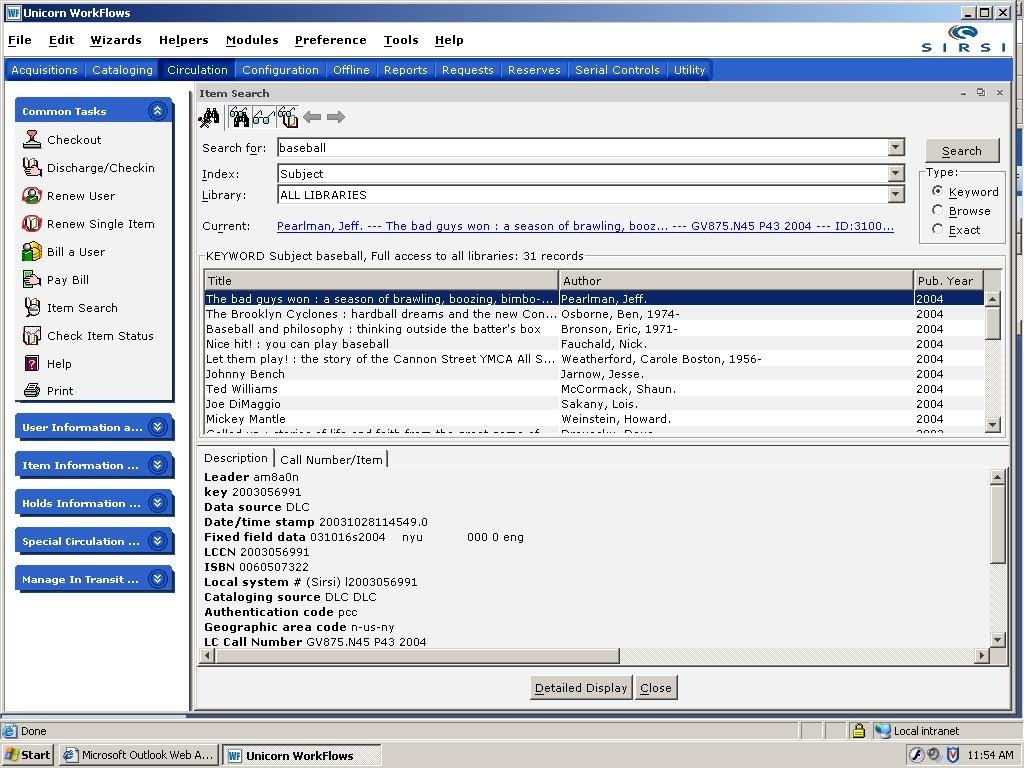
On Monday, April 10, a number of MPLIC staff got their first hands-on experience with the Unicorn staff client, Workflows (a screenshot of which is shown here), and the public catalog interface, the Enterprise Portal Solution.
38 staff members will be attending this week's classes at Central, which include Essential Skills for Workflows and EPS, Circulation, and Cataloging. These sessions (along with additional onsite training scheduled for August, October, and December) will form the foundation for our systemwide training as well as providing members of the Sirsi implementation teams with background information that will help us make decisions about customizing Unicorn to meet our needs.
I would like to encourage staff members who have questions, concerns, or observations to share after having been through Sirsi training to use the Comments feature of this blog to share them with me and the other members of the Implementation Management Team.
For more information about Sirsi training, read this post from February 22.
Image courtesy SirsiDynix
Friday, February 24, 2006
Training Schedule - October 17 - 18
Note: This schedule was updated on October 3, 2006.
All training sessions are three hours long.
All training sessions are three hours long.
| Day | Morning | Afternoon |
|---|---|---|
| Tuesday | Reports, pt. 1 | Reports, pt. 2 |
| Wednesday | Reports, pt. 3 | Pocket Circ |
Training Schedule - Week 2 - Aug. 28 - Sept. 1
Note: This schedule was updated on August 4, 2006.
All training sessions are three hours long.
All training sessions are three hours long.
| Day | Morning | Afternoon |
|---|---|---|
| Monday | Essential Skills | Essential Skills |
| Tuesday | Acquisitions, pt. 1 | Acquisitions, pt. 2 |
| Wednesday | Acquisitions, pt. 3 | Acquisitions, pt. 4 |
| Thursday | Serials, pt. 1 | Serials, pt. 2 |
| Friday | Serials, pt. 3 | Serials, pt. 4 |
Training Schedule - Week 1 - April 10 - 14
All training sessions are three hours long. Morning sessions will begin at 9:00 a.m. and end at 12 noon. Afternoon sessions will begin at 1:00 and end at 4:00.
| Day | Morning | Afternoon |
|---|---|---|
| Monday | Essential Skills | Essential Skills |
| Tuesday | Essential Skills | Essential Skills |
| Wednesday | Cataloging, pt. 1 | Cataloging, pt. 2 |
| Thursday | Circulation, pt. 1 | Circulation, pt. 2 |
| Friday | Cataloging, pt. 1 | Cataloging, pt. 2 |
Wednesday, February 22, 2006
Sirsi Onsite Training - An Overview
Revised Sept. 19, 2006.
The "deliverables" that MPLIC is acquiring from SirsiDynix include a considerable amount of staff training. Many MPLIC staff members will be trained directly by SirsiDynix staff using a generic Unicorn ILS system and database. Most of this training will take place in the Computer Training Room at the Central Library during three weeks in April, August-September, and October. Staff trained in these classes will then have access to self-paced e-learning courses that they can take in their own locations as many times as needed before our "Go Live" date on March 15, 2007. Many of these staff members will become trainers for their co-workers throughout the system.
The classes to be taught onsite by SirsiDynix trainers will include:
Essential Skills for Workflows and EPS/Rooms
A 3-hour class which serves as a prerequisite for all other Unicorn WorkFlows courses. Attendees will learn how to navigate the Workflows interface and the EPS/Rooms OPAC (Online Public Access Catalog).
Cataloging
A one-day class in which attendees will learn how the WorkFlows Cataloging module manages title control data, bibliographic descriptions, and volume and item information; how to create, edit, duplicate, and remove bibliographic records; how to maintain MARC and authority data within the library’s catalog; how to import bibliographic records into the Unicorn catalog via SmartPort or reports; and more.
Circulation
A one-day class designed to provide a basic understanding of the Unicorn Circulation software capabilities and a navigation overview of those functions in the WorkFlows client. The ultimate goal is to train key library staff members so that they in turn may act as trainers for others at their locations. Attendees will learn how to register and modify borrowers; charge, discharge, and renew materials; and more.
Acquisitions
A two-day class designed to provide a basic understanding of the capabilities of the Unicorn Acquisitions software with an overview of navigating those functions in the WorkFlows client. Topics include creating funds, vendors, orders, and invoices. Attendees will also have an opportunity to work practice exercises utilizing what they learn. This class also discusses basic Acquisition reports.
Serials
A two-day class designed to provide a basic understanding of the capabilities of the Unicorn Serials Control software and an overview of navigating those functions in WorkFlows. The ultimate goal of the Serials Control Training Course is to train essential library staff members so that they in turn act as trainers for others. Attendees will learn how to create vendor records, search for existing titles, create serial control records, receive issues, claim issues, and more.
Reports
A one-day class intended for system administrators and other library staff who want to learn how to collect information from the Unicorn system. Attendees will learn how to run a report; determine appropriate report type to run to meet job objectives; interpret report logs/results and identify errors; and more.
PocketCirc
A 2-hour class which will train key staff on the operation of Sirsi's PocketCirc devices, wireless handheld PDAs which allow staff to perform online and offline circulation and inventory operations away from the desk.
Materials Booking
A 3-hour class which provides an overview of the Unicorn Materials Booking Module, which allows for the reserving of library materials or facilities (such as meeting rooms) for a specified time period.
The "deliverables" that MPLIC is acquiring from SirsiDynix include a considerable amount of staff training. Many MPLIC staff members will be trained directly by SirsiDynix staff using a generic Unicorn ILS system and database. Most of this training will take place in the Computer Training Room at the Central Library during three weeks in April, August-September, and October. Staff trained in these classes will then have access to self-paced e-learning courses that they can take in their own locations as many times as needed before our "Go Live" date on March 15, 2007. Many of these staff members will become trainers for their co-workers throughout the system.
The classes to be taught onsite by SirsiDynix trainers will include:
Essential Skills for Workflows and EPS/Rooms
A 3-hour class which serves as a prerequisite for all other Unicorn WorkFlows courses. Attendees will learn how to navigate the Workflows interface and the EPS/Rooms OPAC (Online Public Access Catalog).
Cataloging
A one-day class in which attendees will learn how the WorkFlows Cataloging module manages title control data, bibliographic descriptions, and volume and item information; how to create, edit, duplicate, and remove bibliographic records; how to maintain MARC and authority data within the library’s catalog; how to import bibliographic records into the Unicorn catalog via SmartPort or reports; and more.
Circulation
A one-day class designed to provide a basic understanding of the Unicorn Circulation software capabilities and a navigation overview of those functions in the WorkFlows client. The ultimate goal is to train key library staff members so that they in turn may act as trainers for others at their locations. Attendees will learn how to register and modify borrowers; charge, discharge, and renew materials; and more.
Acquisitions
A two-day class designed to provide a basic understanding of the capabilities of the Unicorn Acquisitions software with an overview of navigating those functions in the WorkFlows client. Topics include creating funds, vendors, orders, and invoices. Attendees will also have an opportunity to work practice exercises utilizing what they learn. This class also discusses basic Acquisition reports.
Serials
A two-day class designed to provide a basic understanding of the capabilities of the Unicorn Serials Control software and an overview of navigating those functions in WorkFlows. The ultimate goal of the Serials Control Training Course is to train essential library staff members so that they in turn act as trainers for others. Attendees will learn how to create vendor records, search for existing titles, create serial control records, receive issues, claim issues, and more.
Reports
A one-day class intended for system administrators and other library staff who want to learn how to collect information from the Unicorn system. Attendees will learn how to run a report; determine appropriate report type to run to meet job objectives; interpret report logs/results and identify errors; and more.
PocketCirc
A 2-hour class which will train key staff on the operation of Sirsi's PocketCirc devices, wireless handheld PDAs which allow staff to perform online and offline circulation and inventory operations away from the desk.
Materials Booking
A 3-hour class which provides an overview of the Unicorn Materials Booking Module, which allows for the reserving of library materials or facilities (such as meeting rooms) for a specified time period.
Subscribe to:
Posts (Atom)