To all MPLIC staff:
Tonight, many of us will hit control-z, choose "Exit Circulation," type QUIT, and say goodbye to DRA Classic for the last time. (Not all of us, as Acquisitions will continue to use the DRA system alongside Unicorn until all orders placed for the current fiscal year have been received and paid for.) What should staff expect when they arrive at work on June 14?
New logins specific to their agencies have been communicated to the managers, circulation, and reference staff in each public service agency. Staff will verify that they are logged into Workflows on the production (i.e., the "real," as opposed to training) system when they see the familiar MPLIC logo in the upper right hand corner of the screen, where they've been seeing a red TEST SYSTEM badge.
DRA Classic Bridge circulation information collected for the last week will have been loaded into the Unicorn system overnight. Each agency should log in as staff arrives, and can immediately begin updating TEMP accounts with customer information for accounts signed up during Classic Bridge. However, staff should not begin begin discharging, checking out or receiving items In Transit until Paul Gahn sends the "all clear" e-mail message, expected between 8:00 and 9:00 AM on Thursday. (At that point, staff can begin processing materials that were held in Route status during the week of Classic Bridge. New materials will not be sent prior to Monday, June 18, to allow staff time to work through this backlog.)
All circulation PCs and some reference desk, manager, and workroom PCs have received memory upgrades; those who haven't received upgrades yet may experience slower than optimal performance, and should bear in mind the advice shared earlier about maximizing performance by closing other programs before starting Workflows, and so on. (Memory upgrades for the remaining staff PCs will resume next week.)
The public web site will still be at http://www.memphislibrary.org, though the familiar "stack o' books" will have been replaced by a new design. Virtually all of the current library web pages will continue to exist and reside at the same URLs, just with a different look. Catalog links will take customers to the new OPAC at http://eps.memphislibrary.org; in addition, a search box at the top of every web page will give access to the catalog as well. Every web page will also feature a login dialog box to give customers quick access to their library accounts, with familiar services like online renewals -- and new services like Holds. The new Holds service will be available from the time we go live, but it's expected that it will take most customers a few days to discover it and start using it (though no one can know for sure, of course). The first hold pick list report will be generated and emailed at approximately 2pm on the day of Go Live.
On public machines, the PCs that have been designated as Catalog or Catalog/Express PCs will open on the Rooms/EPS home page. Printing of catalog pages (which may also include Rooms web pages or listings of database or web citations) will remain free. However, until we become more familiar with the new OPAC configurations, these PCs will not be technically blocked from accessing other sites on the Internet. Managers at each location will have the discretion to decide whether or not to enforce the "catalog use only" policy for these PCs until the technical solution can be put in place.
PCs designated for other special uses besides the catalog will continue to be designated for that use, and should come up to the appropriate "start" page. On general-use public PCs, Internet Explorer will open to the new home page at the same old URL. On staff PCs, the browser will continue to open to the Intranet home page, which is not changing at all. Links to catalog records in blog postings and BookLetters are being changed today or tonight; some remaining web catalog links, such as those for the Teen Book Lists, will not be available for a few days.
Throughout Thursday, Friday, and Saturday, lead circulation trainer Becky Graham will be available at OPX 2747 to assist circulation staff who aren't sure how to perform a function in Workflows. Also on Thursday and Friday, Damone Virgilio and Kevin Dixon will be on the road visiting locations around the system to offer in-person Workflows assistance to reference staff, and will also be available by phone via their cell numbers (e-mailed previously). Paul Gahn, joined onsite by our SirsiDynix SureStart Consultant Pam Tejes, will be available at OPX 2805 to troubleshoot problems when staff are confident they are performing a task just how they were trained, but it’s still not working (password doesn’t work, receipts aren’t printing, etc.).
For questions about the public catalog or web site, please contact yours truly at OPX 2801.
At this time, all our staff have received the essential training they need to do their jobs. We have the knowledge and the skills we need. Mistakes will almost certainly be made -- but they won't be fatal ones. We will all learn from each others' mistakes and improve our understanding, and our service to customers, as we proceed on this journey together. On behalf of the entire Sirsi Implementation Management Team, I would like to thank all of you for your positive attitude and team spirit throughout this 18-month implementation process.
Have a great Go Live!
-- Alan
Showing posts with label Unicorn. Show all posts
Showing posts with label Unicorn. Show all posts
Wednesday, June 13, 2007


Monday, May 21, 2007
Serials check-in procedures during transition to Unicorn
E-mail message from Wang-Ying Glasgow, Serials/Government Publications Manager, to all branch managers, Circulation Services User Group, Serials/Government Publications staff, Serials Liasion Committee, Regional Managers, etc.:
This Friday, May 25th will be the last day for serials check-in on the Classic system.
After Friday, please keep a manual record of issues received. This will continue for sometime after Go Live. Please use index cards for Serials Check-in. These are the green index cards we used to do manual check-in before Serials Online Check-in. Serials will distribute these cards to you in the interoffice mail today. At the top of each index card, please record the serial title, frequency, and whether it is Reference or Circulating. There are two types of these check-in cards – daily and monthly. Please check in daily and weekly on the daily cards, and monthly and quarterly on the monthly cards. File these cards in an alphabetical order.
Then for each issue received: find the correct index card, record the volume/ issue number, date of publication and date received. Please write legibly. You can use the attached for a list of current received titles, simply use the drop down arrow in cell A1 to limit to your agency.
Before Go Live you can continue to shelve and make available to customers any reference copies and newspapers. Please continue to hold circulating magazines until Go Live (June 14), when you can begin creating brief title records for circulation.
Serials data will be migrated to Unicorn, however each library’s serial control record for each title will have to be manually edited to set-up Unicorn parameters and create predictions. Central Serials staff will be using Central to refine procedures before getting branches setup and trained for serials check-in.
Your patience during this transition is appreciated. If you have questions, please contact me.
Thanks!
Wang-Ying Glasgow
Serials/Government Publications Manager
(901)-415-2709
This Friday, May 25th will be the last day for serials check-in on the Classic system.
After Friday, please keep a manual record of issues received. This will continue for sometime after Go Live. Please use index cards for Serials Check-in. These are the green index cards we used to do manual check-in before Serials Online Check-in. Serials will distribute these cards to you in the interoffice mail today. At the top of each index card, please record the serial title, frequency, and whether it is Reference or Circulating. There are two types of these check-in cards – daily and monthly. Please check in daily and weekly on the daily cards, and monthly and quarterly on the monthly cards. File these cards in an alphabetical order.
Then for each issue received: find the correct index card, record the volume/ issue number, date of publication and date received. Please write legibly. You can use the attached for a list of current received titles, simply use the drop down arrow in cell A1 to limit to your agency.
Before Go Live you can continue to shelve and make available to customers any reference copies and newspapers. Please continue to hold circulating magazines until Go Live (June 14), when you can begin creating brief title records for circulation.
Serials data will be migrated to Unicorn, however each library’s serial control record for each title will have to be manually edited to set-up Unicorn parameters and create predictions. Central Serials staff will be using Central to refine procedures before getting branches setup and trained for serials check-in.
Your patience during this transition is appreciated. If you have questions, please contact me.
Thanks!
Wang-Ying Glasgow
Serials/Government Publications Manager
(901)-415-2709
Tuesday, May 15, 2007
Upcoming cutoffs (May 12th) in preparation for Unicorn Go Live! Update-2
E-mail message from Paul Gahn to all reference and circulation staff and branch managers, May 14, 2007:
Using the RI command to change the Item ID (item barcode) on items where the barcode has or is falling off needs to be discontinued. This change won’t migrate to Unicorn.
If discovered during discharge, bill the customer per usual, then route out the item to your agency’s 6 digit code and hold in-house until Go Live. At Go Live you can change the item ID.
If the item is presented for checkout, please mark the item Withdrawn and do an on the fly record for the new barcode.
Security records for Classic logins will be edited to prevent this activity. Beginning tomorrow or earlier, if you try to RI in Bib Services you will see:
>>RI
Not authorized to perform this function ( to continue)
Paul Gahn
Using the RI command to change the Item ID (item barcode) on items where the barcode has or is falling off needs to be discontinued. This change won’t migrate to Unicorn.
If discovered during discharge, bill the customer per usual, then route out the item to your agency’s 6 digit code and hold in-house until Go Live. At Go Live you can change the item ID.
If the item is presented for checkout, please mark the item Withdrawn and do an on the fly record for the new barcode.
Security records for Classic logins will be edited to prevent this activity. Beginning tomorrow or earlier, if you try to RI in Bib Services you will see:
>>RI
Not authorized to perform this function (
Paul Gahn
Large print rotating procedures continue per normal
E-mail message from Paul Gahn to all circulation and reference staff and branch managers, May 14, 2007:
You can continue to return and get large print rotating books from the collection at Cherokee. This includes using the LL (Library loan function in Circulation Services). Although the temporary hold location from Classic doesn’t migrate to Unicorn, as part of Go Live activities, agencies will checkout large print rotating items on display in their agency to their agency large print account (BARLPR, CORLPR etc.) to reflect current location. This will explained further at the June 6th CSUG meeting and another email closer to Go Live.
Only the following libraries are currently authorized to have large print rotating collections in Sirsi Unicorn.
BARTLETT
CORDOVA
EASTSHELBY
FRAYSER
HIGHALND
PKYVILLAGE
POPWHITE
RALEIGH
RANDOLPH
WHITEHAVEN
If an agency believes they should be authorized to receive and display large print rotating, please have the agency manager make a request to the regional manager who will consult with Collection Development.
Thanks,
Paul
You can continue to return and get large print rotating books from the collection at Cherokee. This includes using the LL (Library loan function in Circulation Services). Although the temporary hold location from Classic doesn’t migrate to Unicorn, as part of Go Live activities, agencies will checkout large print rotating items on display in their agency to their agency large print account (BARLPR, CORLPR etc.) to reflect current location. This will explained further at the June 6th CSUG meeting and another email closer to Go Live.
Only the following libraries are currently authorized to have large print rotating collections in Sirsi Unicorn.
BARTLETT
CORDOVA
EASTSHELBY
FRAYSER
HIGHALND
PKYVILLAGE
POPWHITE
RALEIGH
RANDOLPH
WHITEHAVEN
If an agency believes they should be authorized to receive and display large print rotating, please have the agency manager make a request to the regional manager who will consult with Collection Development.
Thanks,
Paul
Monday, May 14, 2007
Upcoming cutoffs (May 12th) in preparation for Unicorn Go Live! Update-1
E-mail message from Paul Gahn to all reference staff, circulation staff, branch managers, and Item Control staff, May 14, 2007:
One additional instruction:
Please do not send requests to Item Control to have items changed from 7-day popular to 21-day checkout. This requires changing the material code and would have to be redone later in Unicorn. So please keep 7-day popular as such until Go Live and then make your request at that time.
If you are withdrawing the item you can continue to mark the item Withdrawn in Circle and follow normal procedures.
Continue to contact Item Control to have them make things available for checkout as needed.
Thanks,
Paul
One additional instruction:
Please do not send requests to Item Control to have items changed from 7-day popular to 21-day checkout. This requires changing the material code and would have to be redone later in Unicorn. So please keep 7-day popular as such until Go Live and then make your request at that time.
If you are withdrawing the item you can continue to mark the item Withdrawn in Circle and follow normal procedures.
Continue to contact Item Control to have them make things available for checkout as needed.
Thanks,
Paul
Wednesday, May 09, 2007
Upcoming cutoffs (May 12th) in preparation for Unicorn Go Live!
E-mail message from Paul Gahn to all staff, May 9, 2007:
With Unicorn Go Live quickly approaching please read carefully…
Saturday, May 12th, 2007 is the last day to perform the following functions in DRA Classic:
1.) Adding on-the-fly/unlinked item records for circulating magazines.
2.) Editing, creating or deleting item notes:
a. Any changes to item notes made after May 12th will not be migrated to SIRSI Unicorn.
After May 12th you can continue to:
a. Even though these won’t migrate, don’t deny a customer to check out a MPLIC circulating item they found on the shelf.
b. For those items still checked-out as of 9pm on June 13th, they will be created and charged to the customer in Unicorn on Go Live (ILL items will be the first priority)
2.) Mark items Missing, Withdrawn, Claims returned and Claims Lost.
a. These statuses migrate because circulation extracts occur closer and immediately before Go Live
3.) Route items in and out per normal activities.
a. Even though Route status doesn’t migrate/translate to Unicorn, we need to continue to use that function in Classic to reflect the location as items are requested and put on the hold shelf or sent to another location.
4.) Contact Item Control to make items available for Checkout.
a. For items that are in Route status because it belongs to another location but was discharged at your location and a customer spots it and wants to check it out.
Note: Cataloging and Item Control will not be adding new items (including gifts, donations) after Saturday, May 12th.
Other approaching cutoffs:
May 25th Last day for Serials check-in in Classic
June 6th Last day to add or edit customer accounts in Classic
Details about each of these cutoffs will be explained in separate emails closer to the dates.
If you have questions, let me know.
Thanks,
Paul
With Unicorn Go Live quickly approaching please read carefully…
Saturday, May 12th, 2007 is the last day to perform the following functions in DRA Classic:
1.) Adding on-the-fly/unlinked item records for circulating magazines.
2.) Editing, creating or deleting item notes:
a. Any changes to item notes made after May 12th will not be migrated to SIRSI Unicorn.
After May 12th you can continue to:
a. Even though these won’t migrate, don’t deny a customer to check out a MPLIC circulating item they found on the shelf.
b. For those items still checked-out as of 9pm on June 13th, they will be created and charged to the customer in Unicorn on Go Live (ILL items will be the first priority)
2.) Mark items Missing, Withdrawn, Claims returned and Claims Lost.
a. These statuses migrate because circulation extracts occur closer and immediately before Go Live
3.) Route items in and out per normal activities.
a. Even though Route status doesn’t migrate/translate to Unicorn, we need to continue to use that function in Classic to reflect the location as items are requested and put on the hold shelf or sent to another location.
4.) Contact Item Control to make items available for Checkout.
a. For items that are in Route status because it belongs to another location but was discharged at your location and a customer spots it and wants to check it out.
Note: Cataloging and Item Control will not be adding new items (including gifts, donations) after Saturday, May 12th.
Other approaching cutoffs:
May 25th Last day for Serials check-in in Classic
June 6th Last day to add or edit customer accounts in Classic
Details about each of these cutoffs will be explained in separate emails closer to the dates.
If you have questions, let me know.
Thanks,
Paul
Wednesday, March 14, 2007
SirsiDynix introduces "Rome"
On the heels of its acquisition in January by Vista Equity Partners, and the departure last month of CEO Patrick Sommers, SirsiDynix announced on Tuesday that it is developing a new ILS, code-named "Rome," to be released later this year. According to the press release, the new technology platform will "built on the proven, scalable and extensible architecture of the industry-standard SirsiDynix Unicorn® Library Management System and will include an impressive set of new solutions created as part of SirsiDynix Horizon 8.0/Corinthian development. " A letter sent to current customers confirms that Unicorn GL3.1 will be the last release of the "Sirsi" ILS under the Unicorn name; the next major upgrade for Unicorn sites will be Rome. SirsiDynix will no longer develop the "Dynix" ILS, Horizon.
While this new development should have no immediate impact on MPLIC's implementation of Unicorn GL3.1, the company's decision to use Unicorn as the basis for continued ILS development should serve us well in the future when it's time to upgrade our system.
While this new development should have no immediate impact on MPLIC's implementation of Unicorn GL3.1, the company's decision to use Unicorn as the basis for continued ILS development should serve us well in the future when it's time to upgrade our system.
Friday, September 29, 2006
Project milestones in September
Members of the Sirsi ILS implementation teams reached the following milestones in September:
- The second week of onsite Sirsi training concluded on Sept. 1.
- The Central Search Connection List, providing information about MPLIC databases to be included in our federated search interface, was provided to Serials Solutions and SirsiDynix on Sept. 8.
- The Library's version of the Unicorn ILS was upgraded from GL 3.0 to the newest version, GL 3.1, on Sept. 11.
- The Library's production server was copied over to the test server on Sept. 13.
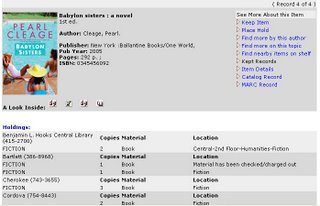
This means that staff are now working with the library's own records when using Workflows and the Rooms/EPS site, rather than a generic training database. Although not all OPAC customizations are in place yet, you can begin to get an idea of the enhanced experience in store for MPLIC customers and staff. - 9xx and EDI (Electronic Data Interchange) training was conducted for Acquistions and Cataloging staff on Sept. 25 and 27.

Coming up in October:
- The new Pocket Circ handheld devices are scheduled to arrive by the beginning of the month.
- SirsiDynix will provide onsite training on Unicorn Reports and Pocket Circ.
- The Acquisitions Team will have a three-day summit with our SirsiDynix SureStart Consultant, Diane Cunningham.
- Phone lines for the SVA (SirsiDynix Voice Automation) customer telephone notification system will be installed.
Image courtesy of SirsiDynix.
Thursday, May 11, 2006
Unicorn and PC screen resolutions
Some of you who have been exploring the EPS/Rooms demo site have noticed that you are unable to view the entire screen without scrolling from left to right. This is due to the EPS interface being designed for computer screens with a resolution of 1024 x 768, whereas staff and public PCs at MPLIC are configured with a resolution of 800 x 600. This is an issue for the Unicorn Workflows program as well, as attendees at the April onsite training discovered. In the computer training room, we were able to adjust screen resolutions on-the-fly, but this is not an option for most MPLIC PCs.
For this reason, in the future Automated Services staff will be reconfiguring all MPLIC PCs to the 1024 x 768 setting. This work will occur gradually over time as Workflows is installed on the PCs used by staff who have attended SirsiDynix training and who will be participating in reviewing a test data load. This activity is currently on the timeline for August, but may be moved forward.
For this reason, in the future Automated Services staff will be reconfiguring all MPLIC PCs to the 1024 x 768 setting. This work will occur gradually over time as Workflows is installed on the PCs used by staff who have attended SirsiDynix training and who will be participating in reviewing a test data load. This activity is currently on the timeline for August, but may be moved forward.
Thursday, March 23, 2006
Sirsi Unicorn & DRA Classic Compared
Damone Virgilio has developed an informative Powerpoint slide show comparing terms we use in DRA Classic with their equivalents. This presentation, which made its debut at the Circulation Services Users Group Meeting in March, has been posted to the Intranet so it can be accessed by all staff. You will find a permanent link to the presentation on the Staff Development Intranet page as well as in this blog's list of links.
When you click on the link you will have the option of saving the Powerpoint file to your hard drive or opening it in the browser. If you choose the latter, the presentation will open in slide show mode. To advance through the presentation, either click the left mouse button or press the Page Down key on your keyboard. To return to the Intranet or blog page you were on, click the "Back" button in the browser.
When you click on the link you will have the option of saving the Powerpoint file to your hard drive or opening it in the browser. If you choose the latter, the presentation will open in slide show mode. To advance through the presentation, either click the left mouse button or press the Page Down key on your keyboard. To return to the Intranet or blog page you were on, click the "Back" button in the browser.
Thursday, March 16, 2006
Unicorn Holds Meeting, February 27, 2006 - Minutes
(As recorded and distributed by Paul Gahn, Unicorn Policy Creation Team Chair)
Unicorn Holds Meeting Minutes
February 27, 2006, 2:30-4pm
Central 2nd Floor Conference Room
Present:
Caroline Barnett, Cordova Manager
Ann Delphin, Circulation Services Manager
Steve Foster, Assistant Director, Support Services
Paul Gahn, Automated Library System Coordinator
Rebecca Graham, Central Circulation
Sallie Johnson, Deputy Director
Janet Majilton, Collection Development Officer
Debby McElroy-Clark, Support Services Manager
Gina Milburn, Humanities Senior Manager
Alan Stewart, Electronic Services Coordinator
1. Preface –SIRSI Unicorn Workflows will not allow items to be placed on hold or send to other branches (what we use Route Out for) without placing and trapping a hold for an account in the patron database.
a. This will add time for the customer and the staff member.
b. To not be able to offer additional services, asking for a library account to request material will be seen as technology for technology's sake by customers and staff.
2. Should we allow on shelf holds to be placed by customers in the online catalog?
a. YES
b. Locations and materials to exclude from holds?
i. Reference locations and items
ii. Popular Library fiction and non-fiction books
iii. New (less than a year old) 3-day entertainment DVDs
1. Probably require a new material code/item type
iv. Popular Library books and new 3-day DVDs would continue to be held until closing only
1. They will be checked out to a special library use account.
a. It could display in EPS (Enterprise Portal Solution) as “On hold for customer”
c. 2 times a day pull report (approximately 8:00 am and 2:00 pm) will become part of daily
operations.
i. Exact run time will be determined later based on other daily maintenance reports.
d. Rationale:
i. Adds a service for customers that they have long asked for, while at the same time prevents long queue lists for hot bestsellers.
3. What is the total number of holds per customer at one time?
a. 25 regardless of user profile (including Educator)
b. Rationale:
i. Students may have required number of sources
ii. No limit currently
4. Will there be a fee for holds?
a. NO
b. Rationale:
i. Unicorn cannot distinguish between holds placed online and those by staff at customer request via phone. To charge would require us to charge customers that are accustomed to receiving a free service.
5. To be determined:
a. Notification method for Available holds?
i. Can we just use email and automated phone (SVA) notices for hold notices?
1. Printing and postage cost would be a new cost and one that would not be recovered since we won’t be charging for holds.
2. Printing daily hold notices would be a major challenge for Automated Services with current staffing.
3. If not hold notices must be printed, hold shelf time would need to be lengthened from 3 days to 5-7 days.
b. How to allow material to be transferred to a pickup location if:
i. Fines or lost items prevent holds?
Staff override? (trying to confirm with SIRSI and other libraries)
ii. Customer A does not yet have an account and wants items sent from Central to Cordova?
1. Hypothesis (trying to confirm with SIRSI and other libraries):
a. Place and trap hold for a special library use account for the pickup location Cordova?
This creates a hold that must be satisfied (checked-out) for the Cordova card or the Central item will be sent back to Cordova after circulation.
1. After being received at Cordova, the item would need to be charged to Cordova but not discharged
Reason: Another hold could have been placed by Customer B while in transit and if the pickup location is also Cordova, the item automatically become an available hold for Customer B
2. Customer A arrives:
1. Item is charged using an override
Unicorn Holds Meeting Minutes
February 27, 2006, 2:30-4pm
Central 2nd Floor Conference Room
Present:
Caroline Barnett, Cordova Manager
Ann Delphin, Circulation Services Manager
Steve Foster, Assistant Director, Support Services
Paul Gahn, Automated Library System Coordinator
Rebecca Graham, Central Circulation
Sallie Johnson, Deputy Director
Janet Majilton, Collection Development Officer
Debby McElroy-Clark, Support Services Manager
Gina Milburn, Humanities Senior Manager
Alan Stewart, Electronic Services Coordinator
1. Preface –SIRSI Unicorn Workflows will not allow items to be placed on hold or send to other branches (what we use Route Out for) without placing and trapping a hold for an account in the patron database.
a. This will add time for the customer and the staff member.
b. To not be able to offer additional services, asking for a library account to request material will be seen as technology for technology's sake by customers and staff.
2. Should we allow on shelf holds to be placed by customers in the online catalog?
a. YES
b. Locations and materials to exclude from holds?
i. Reference locations and items
ii. Popular Library fiction and non-fiction books
iii. New (less than a year old) 3-day entertainment DVDs
1. Probably require a new material code/item type
iv. Popular Library books and new 3-day DVDs would continue to be held until closing only
1. They will be checked out to a special library use account.
a. It could display in EPS (Enterprise Portal Solution) as “On hold for customer”
c. 2 times a day pull report (approximately 8:00 am and 2:00 pm) will become part of daily
operations.
i. Exact run time will be determined later based on other daily maintenance reports.
d. Rationale:
i. Adds a service for customers that they have long asked for, while at the same time prevents long queue lists for hot bestsellers.
3. What is the total number of holds per customer at one time?
a. 25 regardless of user profile (including Educator)
b. Rationale:
i. Students may have required number of sources
ii. No limit currently
4. Will there be a fee for holds?
a. NO
b. Rationale:
i. Unicorn cannot distinguish between holds placed online and those by staff at customer request via phone. To charge would require us to charge customers that are accustomed to receiving a free service.
5. To be determined:
a. Notification method for Available holds?
i. Can we just use email and automated phone (SVA) notices for hold notices?
1. Printing and postage cost would be a new cost and one that would not be recovered since we won’t be charging for holds.
2. Printing daily hold notices would be a major challenge for Automated Services with current staffing.
3. If not hold notices must be printed, hold shelf time would need to be lengthened from 3 days to 5-7 days.
b. How to allow material to be transferred to a pickup location if:
i. Fines or lost items prevent holds?
Staff override? (trying to confirm with SIRSI and other libraries)
ii. Customer A does not yet have an account and wants items sent from Central to Cordova?
1. Hypothesis (trying to confirm with SIRSI and other libraries):
a. Place and trap hold for a special library use account for the pickup location Cordova?
This creates a hold that must be satisfied (checked-out) for the Cordova card or the Central item will be sent back to Cordova after circulation.
1. After being received at Cordova, the item would need to be charged to Cordova but not discharged
Reason: Another hold could have been placed by Customer B while in transit and if the pickup location is also Cordova, the item automatically become an available hold for Customer B
2. Customer A arrives:
1. Item is charged using an override
Subscribe to:
Posts (Atom)